Self-Hosted Open-Source Flashcard App for Spaced Repetition
Yes, Flashcards can be self-hosted. The full application and infrastructure code is open source under the MIT license. You can run the services locally for development or deploy the repository's documented production stack on AWS. If you do not want to operate infrastructure, the hosted app remains available.
What can be self-hosted
The repository contains the services and infrastructure used for the core Flashcards system:
- the web app and admin app
- the backend API and passwordless authentication service
- PostgreSQL schema, migrations, sync, and FSRS-based review scheduling
- the MCP server and machine-facing Agent API
- the AWS CDK stack for networking, database, authentication, APIs, static web hosting, secrets, backups, monitoring, and CI/CD
It also includes native iOS and Android clients. Those apps are separate builds; deploying the AWS stack does not publish your own App Store or Google Play releases for you.
There are two supported ways to run the server-side stack:
- Local development: Docker Compose runs PostgreSQL and the migration job. The repository's scripts run auth, backend, web, and admin development servers on the host.
- Production on AWS: the included CDK stack deploys the documented AWS architecture and connects its public domains through Cloudflare.
Docker Compose is not a one-command production deployment. The production path is AWS-specific, and the project does not claim vendor-neutral infrastructure.
What the repository includes now
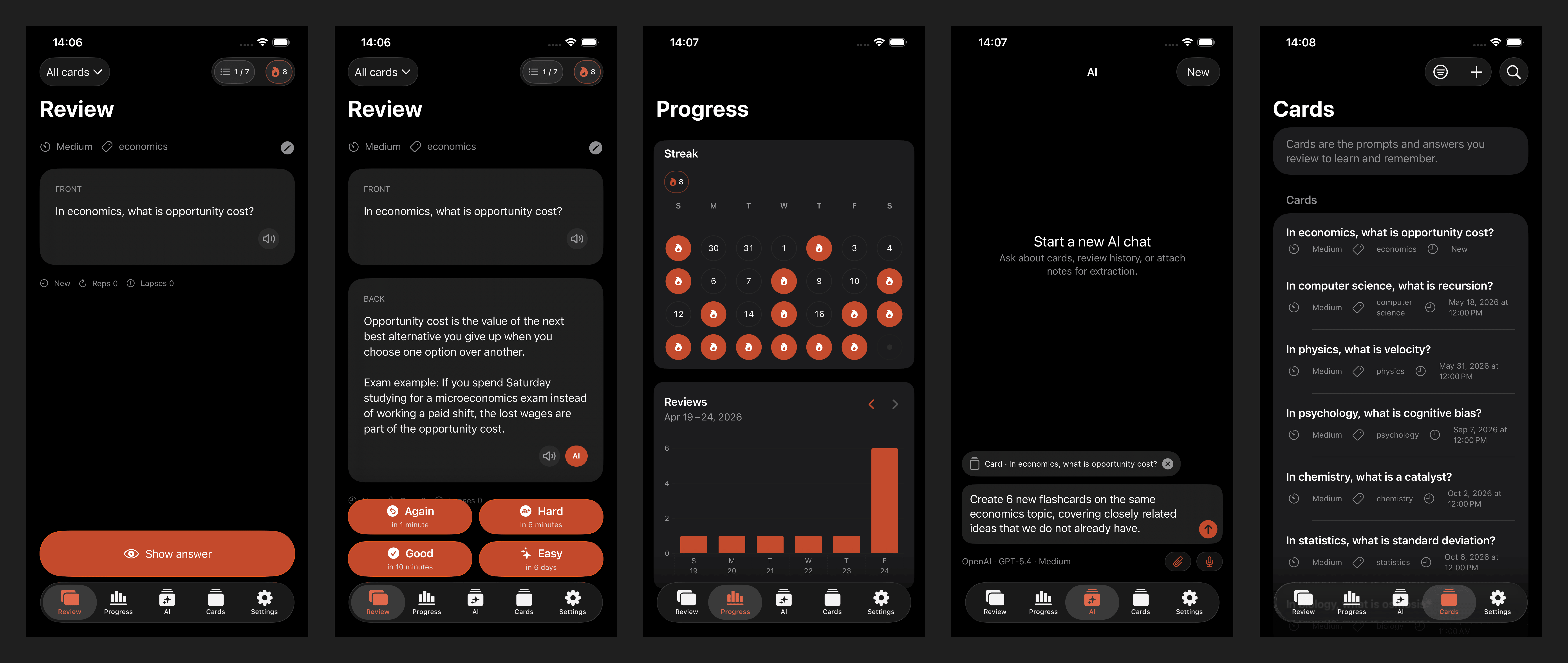
This is more than a standalone flashcard editor. The current repository includes:
- a React web client and admin client
- native SwiftUI iOS and Jetpack Compose Android clients
- offline-first local storage and sync for the human clients
- front/back cards, tags, related media, and FSRS review
- passwordless email OTP through Amazon Cognito and the auth service
- AI chat backed by a deployed asynchronous worker and operator-provided model credentials
- an MCP endpoint for compatible AI clients
- an Agent API for terminal tools and other automated workflows
The architecture documentation is the best source for the current service boundaries. The public API guide explains the hosted Agent API entry point.
Hosted vs self-hosted
| Area | Hosted app | Self-hosted deployment |
|---|---|---|
| Initial setup | Open the app and sign in | Configure accounts, secrets, domains, and deploy the AWS stack |
| Infrastructure | Operated by the Flashcards project | Operated in your AWS and Cloudflare accounts |
| Database and backups | Managed for you | RDS, backup policy, migrations, and recovery are your responsibility |
| Auth and email | Managed for you | Cognito plus your email delivery credentials and DNS |
| AI | Uses the hosted service configuration | Uses the deployed worker and your model credentials; guest access has a separate quota |
| Monitoring | Managed for you | CloudWatch/SNS and your Sentry configuration |
| Updates | Shipped by the hosted service | You pull, validate, deploy, and monitor updates |
| Cost | Hosted plan terms apply | You pay AWS and other provider costs directly |
Self-hosting gives you control of the deployment and database. It also makes you responsible for security updates, secrets, availability, backups, email delivery, monitoring, and cloud costs.
Requirements and local quick start
Local development currently requires Git, Bash, GNU Make, Docker with Docker Compose, Node.js 24, and npm. The provided Compose file runs PostgreSQL 18.4 and applies the database migrations.
From the repository root:
git clone https://github.com/kirill-markin/flashcards-open-source-app.git
cd flashcards-open-source-app
cp .env.example .env
make db-up
npm install --prefix api
npm install --prefix apps/auth
npm install --prefix apps/backend
npm install --prefix apps/web
npm install --prefix apps/admin
For the shortest local-only start, run the backend with the role created by the migration and explicitly enable insecure local authentication:
AUTH_MODE=none \
ALLOW_INSECURE_LOCAL_AUTH=true \
DATABASE_URL=postgresql://backend_app:backend_app@localhost:5432/flashcards \
REPORTING_DATABASE_URL=postgresql://reporting_readonly:reporting_readonly@localhost:5432/flashcards \
make backend-dev
Then run the clients in separate terminals:
make web-dev
make admin-dev
This intentionally does not start the Cognito auth service. The Self-Hosting Guide gives the separate database URLs and environment-loading steps for a full Cognito flow with make auth-dev. The web app runs at http://localhost:3000, the admin app at http://localhost:3001, the backend at http://localhost:8080/v1, and Cognito auth, when configured, at http://localhost:8081.
This quick start covers core backend, web, and admin development. It does not make Chat V2 available: the AUTH_MODE=none transport is not accepted by those routes, and the local commands do not start the asynchronous chat worker.
For production, use the repository's first-deploy flow rather than Docker Compose:
npm ci --prefix apps/auth
bash scripts/deploy/first-deploy.sh \
  --region eu-central-1 \
  --domain example.com \
  --alert-email alerts@example.com
The explicit auth install is currently required from a clean checkout because the deployment helper bundles that package but does not install it. The helper then creates and updates real cloud resources. Read the backend and web deployment guide and AWS CDK deployment guide before running it.
Data portability is useful but deliberately limited
Flashcards package import and export covers cards, their tags, and related media. It does not transfer review history, FSRS scheduler state, workspace settings, full deck structures, or account data.
That distinction matters if you are moving between the hosted service and your own deployment. The portable package is a content transfer path, not a complete database or account migration. For a full operational backup, a self-hosted operator must also manage the PostgreSQL database and media storage created by the AWS stack.
AI and external service credentials
The source code does not include cloud accounts, model credits, or production credentials. A self-hosted operator supplies the relevant configuration:
- AWS credentials and an AWS account for the CDK stack
- a domain and Cloudflare credentials for the documented DNS setup
- Resend credentials for email delivery
- Sentry configuration for required backend monitoring
- optional OpenAI and Langfuse credentials for AI and tracing
- GitHub configuration for the included deployment workflow
AI is optional in the AWS deployment. The CDK stack deploys the asynchronous chat worker, and model credentials enable supported authenticated AI requests. GUEST_AI_WEIGHTED_MONTHLY_TOKEN_CAP separately controls guest AI usage; it is not a global switch for signed-in or bearer-authenticated AI. If you connect MCP or another external AI client, card data included in a request can be processed by that external provider under its own terms; self-hosting the database does not keep those requests inside your infrastructure.
Honest beta and operational limits
Flashcards is still an early product. The repository is active, migrations and deployment configuration can change, and self-hosting assumes that you are comfortable operating an AWS application.
The CDK stack includes backups, alarms, secrets, and deployment automation, but those components still need an operator. You should expect to:
- review infrastructure changes before deploying
- monitor releases and public endpoint checks
- confirm alert subscriptions and email-domain DNS
- protect and rotate credentials
- test restores and plan for AWS costs
- build and distribute native mobile apps separately if you want your own releases
If that operational work is not useful to you, the hosted app is the simpler path.
A brief comparison with Anki and Quizlet
Anki is a mature open-source choice with a large ecosystem and strong desktop workflows. Quizlet is a managed consumer service with a low-setup study experience. Both can be the right choice depending on whether you value an established local tool or a fully managed platform.
Flashcards takes a different path: an open web, mobile, API, and infrastructure repository built around FSRS, sync, AI workflows, MCP, and an AWS self-hosting option. It is younger than Anki and requires substantially more operational work than Quizlet when self-hosted. The reason to choose it is that this combination matches your needs, not that every learner should operate a cloud stack.
Try the hosted app or run your own stack
Use the hosted version when you want to study without maintaining infrastructure. Use the self-hosted path when control of the deployment is worth the AWS, DNS, email, monitoring, and update work.